
What is the Texture Channel Packer?
The Texture Channel Packer is a free utility bundled with OptiDraw (and available separately) that merges up to four grayscale texture maps into a single RGBA texture. This is the standard technique used in AAA pipelines to pack Metallic (R), Ambient Occlusion (G), Detail Mask (B), and Smoothness (A) into one texture — commonly called a Mask Map (HDRP) or MADS map.
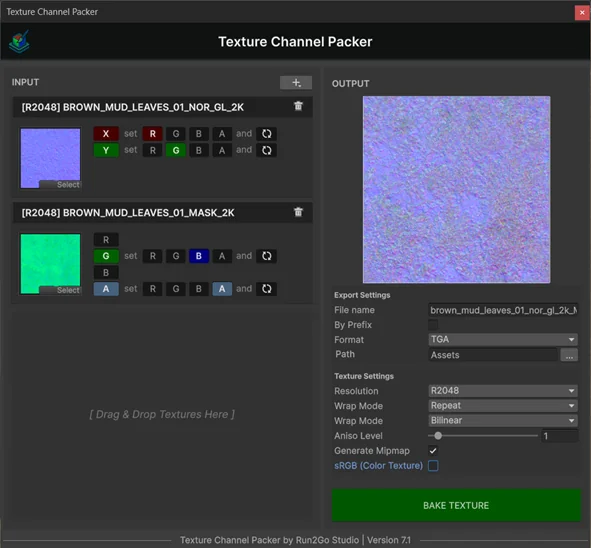
Packing 4 grayscale maps into one RGBA texture reduces your texture memory by 4× compared to keeping them separate. On a 2K texture, that's ~16 MB → ~4 MB.
Opening the Packer
- 1Window → OptiDraw → Texture Channel Packer
- 2Drag your source textures into the R, G, B, A slots
- 3Set output resolution and format (PNG, EXR, or TGA)
- 4Click Pack & Export — the output texture is saved to your chosen folder and auto-imported
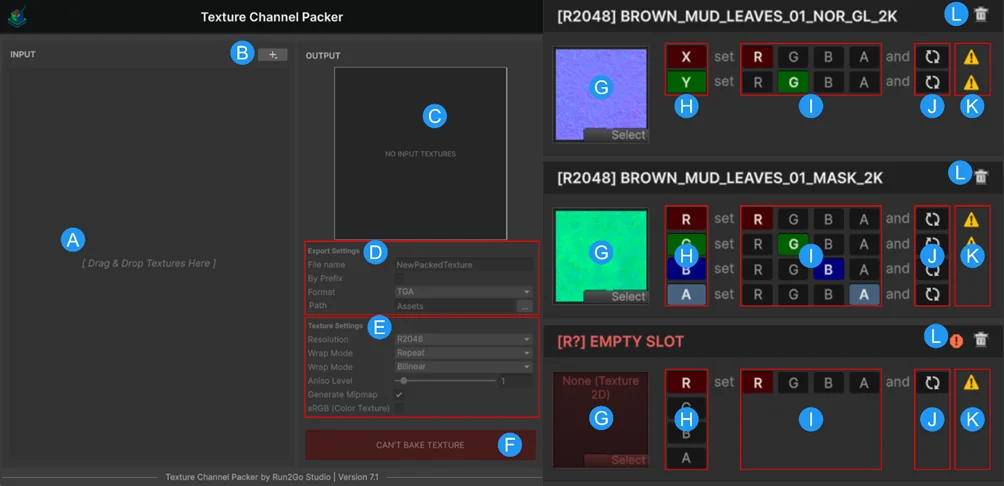
Packing Workflow: RGBA Channel Mapping, Invert Toggles, and Export Presets
Quickly add up to 4 textures by dragging them directly into this zone.
Common Packing Presets
- HDRP Mask Map: R = Metallic, G = AO, B = Detail Mask, A = Smoothness
- URP MetallicSmoothness: R = Metallic, A = Smoothness (GB unused / white)
- Custom Vertex Weight: pack any 4 grayscale data maps for use in Shader Graph
Invert Channel
Each channel slot has an Invert toggle. Use this to convert Roughness → Smoothness (invert A) without pre-processing the source texture in an external tool.